Google has some fantastic potential for you to find whatever you are after on the internet.
To search for a book / program / file perhaps try the following.
Go to Google's search page and use the following criteria in the search dialog
intitle:index.of? file extension Name of item
e.g. intitle:index.of? chm syngress
This will hopefully give you a listing of all websites that google has cached that contain references to files in CHM format that are published by SY
Showing posts with label Internet. Show all posts
Showing posts with label Internet. Show all posts
Monday, May 31, 2010

How to use the Google calculator:
Google’s calculator tries to understand the problem you are attempting to solve without requiring you to use special syntax. However, it may be helpful to know the most direct way to pose a question to get the best results. Listed below are a few suggestions for the most common type of expressions (and a few more esoteric ones).
Most operators come between the two numbers they combine, such as the plus sign in the expression 1+1.
Operator Function Example
+ addition 3+44
- subtraction 13-5
* multiplication 7*8
/ division 12/3
^ exponentiation (raise to a power of) 8^2
% modulo (finds the remainder after division) 8%7
choose X choose Y determines the number of ways of choosing a set of Y elements from a set of X elements 18 choose 4
th root of calculates the nth root of a number 5th root of 32
% of X % of Y computes X percent of Y 20% of 150
Some operators work on only one number and should come before that number. In these cases, it often helps to put the number in parentheses.
Operator Function Example
sqrt square root sqrt(9)
sin, cos, etc. trigonometric functions (numbers are assumed to be radians) sin(pi/3)
tan(45 degrees)
ln logarithm base e ln(17)
log logarithm base 10 log(1,000)
A few operators come after the number.
Operator Function Example
! factorial 5!
Other good things to know
You can force the calculator to try and evaluate an expression by putting an equals sign (=) after it. This only works if the expression is mathematically resolvable. For example, 1-800-555-1234= will return a result, but 1/0= will not.
Parentheses can be used to enclose the parts of your expression that you want evaluated first. For example, (1+2)*3 causes the addition to happen before the multiplication.
The in operator is used to specify what units you want used to express the answer. Put the word in followed by the name of a unit at the end of your expression. This works well for unit conversions such as: 5 kilometers in miles.
You can use hexadecimal, octal and binary numbers. Prefix hexadecimal numbers with 0x, octal numbers with 0o and binary numbers with 0b. For example: 0x7f + 0b10010101.
The calculator understands many different units, as well as many physical and mathematical constants. These can be used in your expression. Many of these constants and units have both long and short names. You can use either name in most cases. For example, km and kilometer both work, as do c and the speed of light.
Feel free to experiment with the calculator as not all of its capabilities are listed here. To get you started, we’ve included a few expressions linked to their results.
1 a.u./c
56*78
1.21 GW / 88 mph
e^(i pi)+1
100 miles in kilometers
sine(30 degrees)
G*(6e24 kg)/(4000 miles)^2
0x7d3 in roman numerals
0b1100101*0b1001
More info on:
http://www.google.co.in/help/calculator.html
Sunday, May 30, 2010
Get unlimited bandwidth from your host for free
Get unlimited bandwidth from your host for free
NOTE: This applies only to specific hosting companies, due to the
specific setup needed and does have its drawbacks.
While setting up hosting space with a specific company I often deal
with, I noticed that they used a shared IP. (IP shared by two or more
websites/domains.) Well, the rates for unlimited bandwidth were
around $50+ per month, which I found unreasonable. I didnt require
much space, and didnt want to be limited to a mere 3 gig of traffic
per month.
Back on track... When setting up the acct, the hosting company needs
to know the domain name so that they can dire
NOTE: This applies only to specific hosting companies, due to the
specific setup needed and does have its drawbacks.
While setting up hosting space with a specific company I often deal
with, I noticed that they used a shared IP. (IP shared by two or more
websites/domains.) Well, the rates for unlimited bandwidth were
around $50+ per month, which I found unreasonable. I didnt require
much space, and didnt want to be limited to a mere 3 gig of traffic
per month.
Back on track... When setting up the acct, the hosting company needs
to know the domain name so that they can dire
Free Access To Websites Without Registering
Free Access To Websites Without Registering
Go to
-http://bugmenot.com/
and type the URL of the website you want to log into.
Examples:
-http://www.nytimes.com/, -http://www.winnetmag.com/
etcetera.
Another (and better) way is changing the user agent of your browser to:
Googlebot/2.1+
-http://www.googlebot.com/bot.html
This is very easy in Mozilla's Firefox. Download and install the User Agent Switcher from
-http://www.chrispederick.com/work/firefox/useragentswitcher/
and add the Googlebot user agent.
Have fun, Dead Dreamer!
-]Edit[- Now this kicks ass, was just browsing entire forum without even needing to login to view restricted areas, and it works on other sites
And no, you cant access the hidden forums either, already tried that
Go to
-http://bugmenot.com/
and type the URL of the website you want to log into.
Examples:
-http://www.nytimes.com/, -http://www.winnetmag.com/
etcetera.
Another (and better) way is changing the user agent of your browser to:
Googlebot/2.1+
-http://www.googlebot.com/bot.html
This is very easy in Mozilla's Firefox. Download and install the User Agent Switcher from
-http://www.chrispederick.com/work/firefox/useragentswitcher/
and add the Googlebot user agent.
Have fun, Dead Dreamer!
-]Edit[- Now this kicks ass, was just browsing entire forum without even needing to login to view restricted areas, and it works on other sites
And no, you cant access the hidden forums either, already tried that
Flashget Broadband Tweak
Flashget Broadband Tweak
Just double-click on the FlashGetRegTweak.reg file to enter the tweak into the registry. This tweak will allow up to 100 simultaneous file downloads, each split into a max of 30 parts. Previous defaults were 8 & 10 respectively.
Note:
1. Works for dialup but not really advantageous.
2. Restart your computer to feel the full advantage of this tweak.
Download:
here it is
just copy to notepad
rename to Iwillsinglehandedlykillallthebandwidthfromtheserversidownloadfrom.reg
REGEDIT4
[HKEY_CURRENT_USER\Software\JetCar\JetCar\General]
"Max Parallel Num"="100"
"MaxSimJobs"="100"
Just double-click on the FlashGetRegTweak.reg file to enter the tweak into the registry. This tweak will allow up to 100 simultaneous file downloads, each split into a max of 30 parts. Previous defaults were 8 & 10 respectively.
Note:
1. Works for dialup but not really advantageous.
2. Restart your computer to feel the full advantage of this tweak.
Download:
here it is
just copy to notepad
rename to Iwillsinglehandedlykillallthebandwidthfromtheserversidownloadfrom.reg
REGEDIT4
[HKEY_CURRENT_USER\Software\JetCar\JetCar\General]
"Max Parallel Num"="100"
"MaxSimJobs"="100"
How To: Change Your Ip In Less Then 1 Minute
Change Your Ip In Less Then 1 Minute
1. Click on "Start" in the bottom left hand corner of screen
2. Click on "Run"
3. Type in "command" and hit ok
You should now be at an MSDOS prompt screen.
4. Type "ipconfig /release" just like that, and hit "enter"
5. Type "exit" and leave the prompt
6. Right-click on "Network Places" or "My Network Places" on your desktop.
7. Click on "properties"
You should now be on a screen with something titled "Local Area Connection", or something close to that, and, if you have a network hooked up, all
1. Click on "Start" in the bottom left hand corner of screen
2. Click on "Run"
3. Type in "command" and hit ok
You should now be at an MSDOS prompt screen.
4. Type "ipconfig /release" just like that, and hit "enter"
5. Type "exit" and leave the prompt
6. Right-click on "Network Places" or "My Network Places" on your desktop.
7. Click on "properties"
You should now be on a screen with something titled "Local Area Connection", or something close to that, and, if you have a network hooked up, all
What is BandWidth?
This is well written explanation about bandwidth, very useful info.
BandWidth Explained
Most hosting companies offer a variety of bandwidth options in their plans. So exactly what is bandwidth as it relates to web hosting? Put simply, bandwidth is the amount of traffic that is allowed to occur between your web site and the rest of the internet. The amount of bandwidth a hosting company can provide is determined by their network connections, both internal to their data center and external to the public internet.
Network Connectivity
The internet, in the most simplest of terms, is a group of millions of computers connected by networks. These connections within the internet can be large or small depending upon the cabling and equipment that is used at a particular internet location. It is the size of each network connection that determines how much bandwidth is available. For example, if you use a DSL connection to connect to the internet, you have 1.54 Mega bits (Mb) of ba
Abut Ftp,Setting Up A Ftp:
Well, since many of us have always wondered this, here it is. Long and drawn out. Also, before attempting this, realize one thing; You will have to give up your time, effort, bandwidth, and security to have a quality ftp server.
That being said, here it goes. First of all, find out if your IP (Internet Protocol) is static (not changing) or dynamic (changes everytime you log on). To do this, first consider the fact if you have a dial up modem. If you do, chances are about 999 999 out of 1 000 000 that your IP is dynamic. To make it static, just go to a place like h*tp://www.myftp.org/ to register for a static ip address.
You'll then need to get your IP. This can be done by doing this:
Going to Start -> Run -> winipcfg or www.ask.com and asking 'What is my IP?'
After doing so, you'll need to download an FTP server client. Personally, I'd recommend G6 FTP Server, Serv-U FTPor Bullitproof v2.15 all three of which are extremely reliable, and the norm of the ftp world.
You can download them on this site: h*tp://www.liaokai.com/softw_en/d_index.htm
First, you'll have to set up your ftp. For this guide, I will use step-by-step instructions for G6. First, you'll have to go into 'Setup -> General'. From her
What is Internet,Basic Guide
The Internet is a computer network made up of thousands of networks worldwide. No one knows exactly how many computers are connected to the Internet. It is certain, however, that these number in the millions.
No one is in charge of the Internet. There are organizations which develop technical aspects of this network and set standards for creating applications on it, but no governing body is in control. The Internet backbone, through which Internet traffic flows, is owned by private companies.
All computers on the Internet communicate with one another using the Transmission Control Protocol/Internet Protocol suite, abbreviated to TCP/IP. Computers on the Internet use a client/server architecture. This means that the remote server machine provides files and services to the user's local client machine. Software can be installed on a client computer to take advantage of the latest access technology.
An Internet user has access to a wide variety of services: electronic mail, file transfer, vast information resources, interest group membership, interactive collaboration, multimedia displays, real-time broadcasting, shopping opportunities, breaking news, and much more.
The Internet consists primarily of a variety of access protocols. Many of these protocols feature programs that allow users to search for and retrieve material made available
No one is in charge of the Internet. There are organizations which develop technical aspects of this network and set standards for creating applications on it, but no governing body is in control. The Internet backbone, through which Internet traffic flows, is owned by private companies.
All computers on the Internet communicate with one another using the Transmission Control Protocol/Internet Protocol suite, abbreviated to TCP/IP. Computers on the Internet use a client/server architecture. This means that the remote server machine provides files and services to the user's local client machine. Software can be installed on a client computer to take advantage of the latest access technology.
An Internet user has access to a wide variety of services: electronic mail, file transfer, vast information resources, interest group membership, interactive collaboration, multimedia displays, real-time broadcasting, shopping opportunities, breaking news, and much more.
The Internet consists primarily of a variety of access protocols. Many of these protocols feature programs that allow users to search for and retrieve material made available
Rapidshare Premium Account Like Downloading-Resume supported...
This summary is not available. Please
click here to view the post.
Flash Speed 200% v3.7 internet accelerator
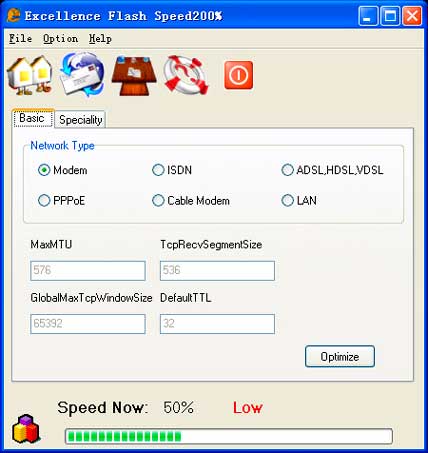
FlashSpeed200% is an Internet accelerator that help you
DOWNLOAD
Subscribe to:
Posts (Atom)

